AI TOOL / #04050
AI Roundtable
Ask a question and receive answers from multiple AI assistants.
Introduction
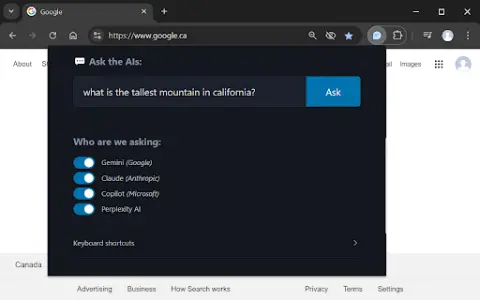
Ask one question, get answers from multiple AI assistants.
What is a Multiple AI Assistants Chrome extension/plug-in?
This website allows users to submit questions at once and receive answers from multiple AI assistants. Users can customize which assistant they want to use for their queries. The website also provides keyboard shortcuts, making it easy to access various functions quickly.
How to use the Multiple AI Assistants Chrome extension?
Use the shortcut keys Ctrl/Cmd + Shift + Q to open the query window and start typing your question. Use Alt + 1 to switch to Gemini, Alt + 2 to switch to Claude, Alt + 3 to switch to Copilot, and Alt + 4 to switch to ChatGPT.
The core functions of various AI Assistant extensions/plugins for Chrome.
Query multiple AI assistants simultaneously
It is possible to customize the selection of AI assistants.
Convenient and fast keyboard shortcuts
Related
Transkriptor Transcribe Audio to Text
An AI-powered browser extension for speech-to-text conversion, enabling fast and secure transcription.
Yapping
Yapping is a Chrome extension that enables voice interaction with ChatGPT, offering advanced features at a lower cost.
AdutorAI
AI tools convert speech into clear, structured text and support style customization.
VoiceInk
An open-source speech-to-text app for macOS that provides local AI to protect privacy and support offline use.
MyVoice – Speech Assistant
A text-to-speech application designed to assist individuals with speech difficulties.
Dhwani
Dhwani offers affordable TTS services with flexible pricing and multiple AI voices.