AI TOOL / #08846
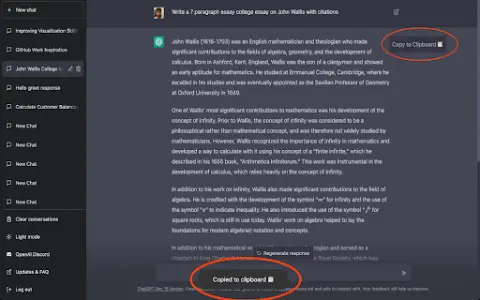
Copy for Chat GPT
An extension used to copy ChatGPT responses and check for plagiarism.
Introduction
Extension to copy ChatGPT responses and check for plagiarism.
What is the Plagiarism Detector Extension for Chrome – an extension/plug-in for Google Chrome?
This extension allows you to copy the responses generated by ChatGPT by clicking a button or using the CMD+K shortcut key, and then have those responses checked by plagiarism detection tools.
How to use the Plagiarism Detector Extension for Chrome?
You can use this extension by clicking the copy button on ChatGPT’s response or by pressing CMD+K. The copied text will be automatically checked to determine whether it contains any plagiarized content.
The core functionality of the Plagiarism Detector Extension for Chrome.
One-click to copy the response from ChatGPT
Use the CMD+K shortcut key to copy.
Automatic plagiarism detection
Related
AI Meeting Tool
AI-based meeting tools automatically schedule meetings, process payments, and provide AI-powered meeting assistance.
Wavve AI
An artificial intelligence platform used for audio recording, transcription, summarization, and content generation.
JotPsych
A Chrome extension designed for JotPsych, which allows the recording of interactions between providers and patients, including remote medical consultations.
YBL Connect
The Google Meet plugin is used for recording, transcribing, and summarizing meetings.
Meetingly
AI conversation intelligence designed for sales calls, capable of performing transcription, summarization, and insight extraction.
AI-TTS
Free text-to-speech generator, featuring highly realistic AI voices.