AI TOOL / #06290
Audeus: Text to Speech Reader
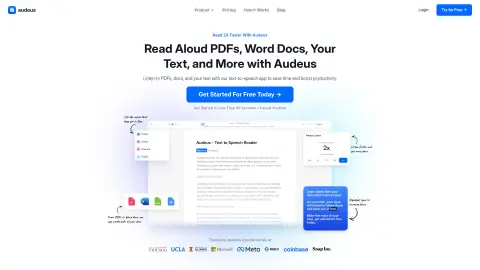
Text-to-speech applications designed for use with PDF and Word documents, among others, help enhance productivity.
Introduction
Text-to-speech app for PDFs, Word docs, and more to boost productivity.
What is Audeus?
Audeus is an immersive text-to-speech (TTS) reading application designed to provide voice-based reading functionality for PDFs, Word documents, and other files. Users can listen to documents, texts, and web articles through this app, thereby saving time and improving efficiency. Audeus supports a variety of file formats, including PDF, Word (docx), and DRM-free EPUB files, and it is integrated with Chrome, Canva, and OpenAI. It offers high-quality audio, synchronized text highlighting, and customizable playback speeds, all of which help enhance comprehension and memory retention.
How to use Audeus?
Register an account, upload your documents (PDFs, Word files, text files, web articles), select the desired audio version, and start listening. The app will save your reading progress, estimate the total listening time, and allow you to adjust the playback speed at any time.
The core functions of Audeus
Immersive text-to-speech reader
natural-sounding voice
Synchronized text highlighting
Customizable playback speed
Supports multiple file formats (PDF, Word, EPUB).
Web-based accessibility
Chrome extension
Integration with Canva
OpenAI Text-to-Speech
Related
ShroomPen
A web-based writing assistant that doesn't upload to the cloud
Floot
Developing applications directly using Claude and ChatGPT.
Leno Bird
AI-generated content for the detail page of cross-border e-commerce product images
LibTV
AI Video Creation Workspace
Teable
AI spreadsheet and business system
NovaSynth
AI voice agent stress testing platform