AI TOOL / #06228
Two Way Voice for Bing AI
Bing AI's voice interaction capabilities enable support for voice-based questions and answers.
Introduction
Voice interaction extension for Bing AI, enabling voice-based questions and responses.
What is the Bing AI Voice Extension, an Chrome extension/plugin?
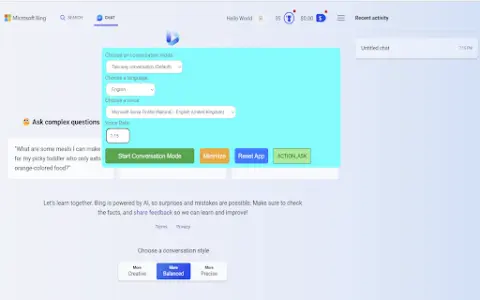
This extension enhances the Bing AI website by enabling voice interaction. Users can pose questions verbally and receive answers in either audio or text format. It offers the convenience of hands-free operation and supports multiple languages, including Nepali, Chinese, and Korean.
How to use the Bing AI Voice Extension for Chrome?
Enable the dialogue mode within the Bing AI website. This extension manages the sequence of questions and answers between you and Bing AI. You can choose from three modes: two-way audio communication, text input for voice responses, or text input for audio replies.
The core functionality of the Bing AI Voice Extension for Chrome.
Voice-based questions and answers
Multiple dialogue modes
Multi-language support (Nepali, Chinese, Korean)
Automatic round-robin scheduling
Related
Brainfish Agent Assist
Agent Assist helps customer service agents resolve issues faster with instant, tailored answers.
Bold360
Chrome extension for quick access to the Bold360 Knowledge Base and suggest new topics.
moyoNote
An all-in-one AI tool for organizing information into mind maps with interactive Q&A and secure sharing.
OpenChit
An AI chat client with text, voice, and knowledge base capabilities.
Heyday
An AI-powered memory assistant that helps you recall forgotten information while you are browsing the web.
THEO: Your-Context-Powered AI
An AI assistant designed for startups, which provides structured business context for strategic AI applications.