AI TOOL / #05339
Chatgpt – Google Doc Analyser
Analyze Google Documents to obtain insights and summaries – no need to manually copy and paste the content into AI tools.
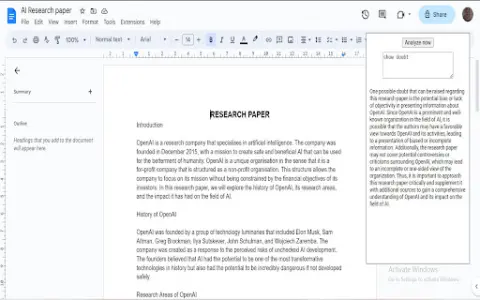
Introduction
Analyzes Google Docs, providing insights and summaries without manual copy-pasting to AI tools.
What is the Google Documents Analyzer Extension for Chrome? What is this extension/plug-in?
The Google Docs Analysis Extension is a tool designed to analyze documents created by Google Docs, eliminating the need to manually copy and paste them into AI systems such as OpenAI’s ChatGPT. It provides suggestions and generates solutions to help users understand contracts, research papers, transcribed texts, and other materials.
How to use the Google Documents Analyzer Extension for Chrome?
Install the Google Docs Analysis extension. Open a Google Doc – whether it’s a contract, a research paper, or transcribed text – and use the prompts provided to analyze the document. This extension will generate solutions or summaries based on the content of the document.
The core functionality of the Google Documents Analyzer Extension for Chrome.
Tips for analyzing Google Docs
Generate summaries and insights directly within Google Docs.
Eliminate the need to manually copy and paste data into external AI tools.
Related
Transcribing music using bubble sound technique
An AI-based music transcription practice tool that can identify musical scores automatically
Mikage
The Nintendo 3DS simulator, currently in development, is designed to accurately recreate the original handheld gaming experience. It is still being actively developed and is compatible with both PC and Android platforms.
RetroArch
An open-source, multi-platform front-end that integrates a large number of Libretro core components. This single software is capable of simulating dozens of different consoles and handheld devices, including FC, SFC, MD, GBA, PS1, N64, and more.
Lightning simulator
An emulator designed for running Android mobile games and applications on PCs. It is renowned for its high performance and stability, and supports multi-window operation as well as control via keyboard and mouse.
Offstage Cloud
Cloud-based macOS sandbox for AI agents
Douban Reading
Original Literature and Digital Publishing Platform