AI TOOL / #04197
Text Selected
An extension for selecting text and retrieving relevant answers from a remote JSON file.
Introduction
Extension for selecting text and getting relevant answers from a remote JSON file.
What is the Text Selection Extension AI Chrome extension/plugin?
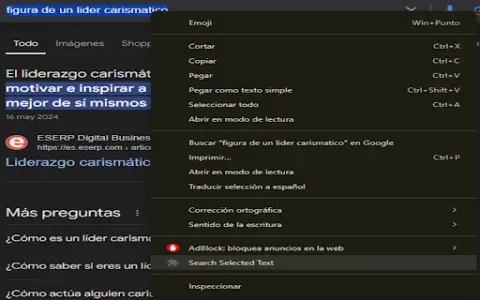
This extension allows users to select text on a webpage and quickly and efficiently get relevant answers. When you select text and use the extension’s context menu option, the selected text is sent to a remote service, which searches for the corresponding answer in a JSON file hosted on Google Cloud Storage. The answer is then displayed as an alert, providing you with additional information about the selected text. This is a useful tool for getting data and answers while browsing the web.
How do I use the Text Selection Extension AI Chrome extension/plugin?
Select text on a webpage and use the extension’s context menu option; the answer will be displayed in an alert.
Core features of the Text Selection Extension AI Chrome extension/plugin
Text selection and answer retrieval
Context menu integration
Remote JSON data source
Alert-based answer display
Related
Image Search
Reverse image search extension, used for finding similar images, social media content, and detecting the unauthorized use of images.
OPIC
An AI-powered platform for sharing activity photos, featuring facial recognition and brand-related features.
Gatherpro.events
An artificial intelligence-based platform for managing activity photos, which makes it easy to upload, organize, and share photos.
Face Recognition, Liveness Detection, ID Document Recognition SDK
MiniAiLive provides biometric authentication and OCR solutions to ensure secure identity verification across industries.
Dore AI
DoreAI: An AI mobile development kit designed for use in iOS and Android applications.
Twinit
An AI-based beauty platform designed for skin analysis and personalized recommendations for cosmetics.