AI TOOL / #04132
ChatGPT Rewriter
Chrome extensions are used to rewrite text or to submit questions using ChatGPT.
Introduction
Chrome extension to rewrite text or ask questions using ChatGPT.
What is the ChatGPT Rewriter AI Chrome extension/plug-in?
This Chrome extension enables you to use ChatGPT to enhance and refine your text. It allows users to directly rewrite selected text within the browser or submit questions to ChatGPT.
How to use the ChatGPT Rewriter AI Chrome extension/plug-in?
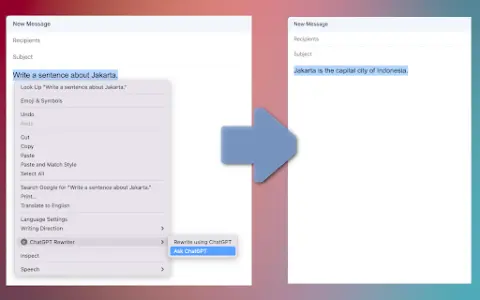
1. Select any editable text in your browser.
2. Look for the option to use the ChatGPT rewriting tool.
3. If you wish to rewrite the text, please select "Rewrite using ChatGPT".
4. If you have any questions, please choose "Ask ChatGPT".
5. The answer will replace your original text.
During text processing, a loading indicator will appear in the upper right corner of the page.
To use this extension, you must have a ChatGPT account. Once your account is set up, the extension will guide you through the process of generating and configuring your API key.
The core functions of the ChatGPT Rewriter AI Chrome extension/plug-in
Use ChatGPT to rewrite the selected text.
Ask ChatGPT questions directly from your browser.
Guidelines for API Key Configuration
Related
Dilog
Use AI to simulate the customer interface for a few minutes in order to test your ideas.
IrisGo
It seems that this desktop AI automation can be easily reproduced just by following your steps once.
Vresk
A unified AI dialogue workbench that aggregates multiple open source large models
RemoveText.video
An AI tool that can remove hard subtitles, text, and icons from videos online.
Kilo Code
An open-source AI programming agent that supports over 500 different models.
Hemory
Give AI agents portable memory.