AI TOOL / #03872
ChatGPT for all sites
AI assistant plugins that can be used for reading, writing, translation, and other purposes on any website.
Introduction
AI assistant plugin for reading, writing, translation, and more on any website.
What is the ChatGPT for All Sites AI Chrome extension/plug-in?
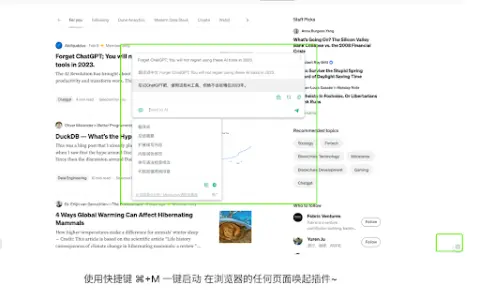
ChatGPT, suitable for use on all websites, is a powerful AI assistant plugin designed to enhance your learning and working experience. It offers a range of useful features, including quick access via shortcut keys, reading assistance (such as article summaries and code explanations), writing support (grammar checking and content generation), as well as translation capabilities in both natural language and programming languages. The plugin also includes pre-set prompt templates to assist you with various online tasks on any website you visit.
How to use the ChatGPT for All Sites AI Chrome extension/plug-in?
Install the ChatGPT plugin that is compatible with all websites, and then activate it by using the shortcut key ⌘+M on any web page. Next, make use of various features such as the reading assistant, writing assistant, and translation tool to enhance your browsing experience.
The core functionality of the ChatGPT for All Sites AI Chrome extension/plugin
One-click activation (⌘+M)
Reading Assistant (Summary, Explanation)
Writing Assistant (Grammar, Content Generation)
Translation (of natural language and programming languages)
Predefined prompt template
Related
UnleashX
Cross-departmental enterprise AI employee platform
ShareOne
Sharing and word-highlighting feedback for pages generated by AI
Qovest
The AI research and investment assistant launched by Alibaba Cloud
Glasshand
Renting real iPhones and Macs for AI agents
DocsAlot
A managed document platform that can be read by both humans and AI systems
crystl
Terminal for managing multiple AI programming agents on macOS