AI TOOL / #02395
PBI Pilot – Seu assistente de Power BI
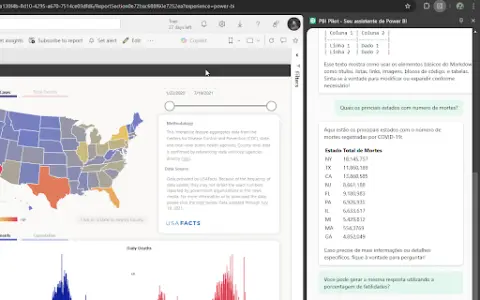
Power BI utilizes generative artificial intelligence to enable real-time data interaction, queries, and chart generation.
Introduction
Power BI uses Generative AI for real-time data interaction, queries, and chart generation.
What is the Power BI AI Chrome extension/plug-in?
Power BI leverages the powerful capabilities of generative artificial intelligence to enhance data interaction. It enables users to perform real-time queries, engage in dialogue with data, generate charts, and carry out various other tasks.
How to use the Power BI AI Chrome extension/plug-in?
Use Power BI to connect to data sources, and then leverage AI-driven features to pose questions in natural language, generate visualizations, and extract insights from the data.
The core features of the Power BI AI Chrome extension/plug-in
Artificial intelligence-driven data querying and analysis
Real-time data interaction
Automated chart and visualization generation
Related
grafychat
An AI chat client that places emphasis on privacy, offering canvas-based organization capabilities and support for multiple models.
DocuDive
An AI-powered platform for document understanding, information extraction, and interactive chat.
Visus.ai
Train your ChatGPT AI using your own documents and knowledge base.
Zecoba AI Chat
Affordable, on-demand access to GPT4 and AI-powered drawing tools, available from both OpenAI and Midjourney.
Boundless AI
Unbounded AI: A platform that provides enterprises with customized chatbots.
ChaptersAI
The GPT client designed for branched conversations is ideal for complex projects and in-depth analyses.