AI TOOL / #01719
Draftio Chrome Extension
Draftio uses AI and a Chrome extension to turn web page notes into actionable insights.
Introduction
Draftio transforms web notes into actionable insights with AI and a Chrome extension.
What is the Draftio AI Chrome extension/plugin?
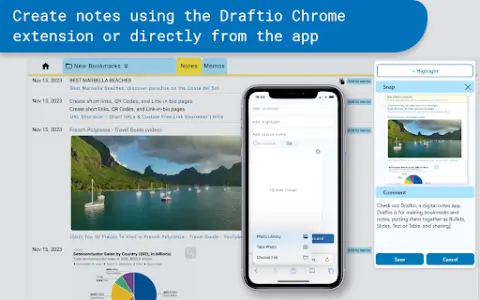
Draftio is an app designed to turn notes taken while browsing the web into actionable insights. It enhances research efficiency through AI features and integrates with the Chrome extension to enable fast and efficient bookmarking and note-taking. The web clipper allows users to save selected content directly to their Draftio account, making it easy to turn scattered notes into coherent online memos.
How do I use the Draftio AI Chrome extension/plugin?
Use the Draftio Chrome extension to bookmark webpages and take notes. Select notes you've taken previously, format them as needed (such as bullet points, tables, slides, or text), and share them instantly as a web memo.
Core Features of the Draftio AI Chrome Extension/Plugin
Web Clipping and Note-Taking
AI-Driven Summarization and Drafting
Flexible, multi-field note structure
Creating and Formatting Memos
Share by generating a link
Related
Webutler.AI – AI powered web scraper
An automated AI data extraction tool that requires no coding to use.
Receipts
Receipt analysis is used to process iMessage data in order to gain insights into relationships and conduct dialogue analysis.
PH Copilot – AI-Powered Product Hunt Assistant
A Chrome extension designed for Product Hunt users, which uses artificial intelligence to enhance engagement and efficiency.
R2D2
AI-powered revenue automation tool for sales, marketing, and customer service teams.
SAP CX AI Toolkit
An AI assistant that understands your business needs, designed to enhance work efficiency.
QuickAction
A secure generative artificial intelligence platform connected to GPT4 32k, specifically designed to serve businesses.